




01
Key messages baked into images
An offer, a price or a headline that only exists as pixels is invisible to AI and screen readers. Your main message disappears from the summary.
Run your free AI fit check
Scan your brand nowAI is changing how emails are read, interpreted and prioritised. Discover what marketers need to change today to stay visible, relevant and actionable.
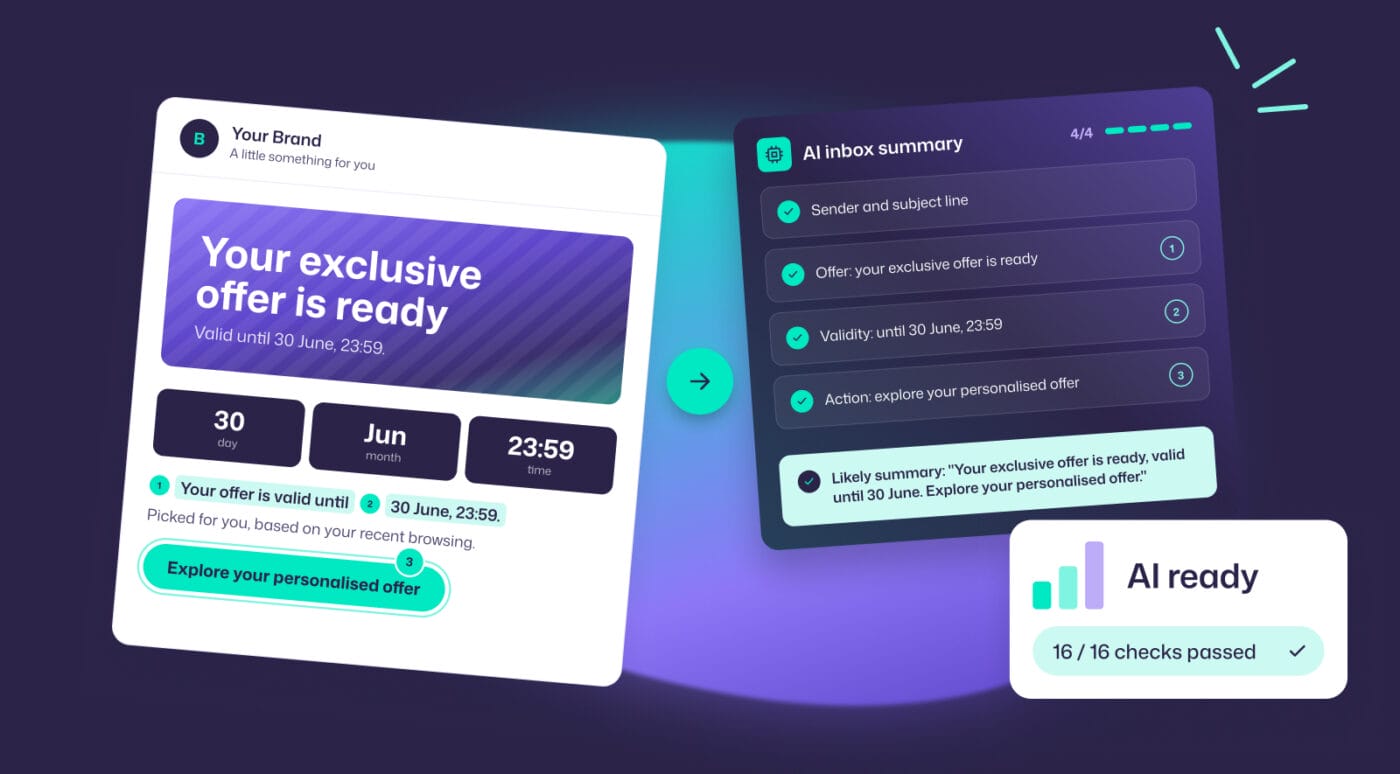

For years, email had one audience: the person reading it. That's no longer the whole story. AI-assisted inbox features, such as Gemini in Gmail, can now summarise messages, highlight what looks important and help people decide what to open.
These features aren't everywhere yet, and they'll keep evolving. But the direction is clear: more of what your subscribers learn from your email will come from what AI understands of it.
Marketers who wait for this to become standard will be catching up. Those who prepare now will stay visible, relevant and actionable as the inbox changes.
The changing email experience
People look at an email. AI reads it. Inbox assistants work from the text and structure behind your design: the live copy, the alt text, the reading order and the language tags.
That's why message clarity matters more than ever. A beautifully designed email can still come across as empty or jumbled to an AI summary if the important parts only exist as images or sit in the wrong order in the code.
What your subscriber sees
Example email: the offer, "Your exclusive offer is ready", and its end date are inside a banner image and a countdown graphic, with a "Click here" button.Example email: "Your exclusive offer is ready" and "Your offer is valid until 30 June, 23:59" are live text, with an "Explore your personalised offer" button.
What the AI inbox can read
Likely summary: "Promotional email from Your Brand." The offer is invisible.Likely summary: "Your exclusive offer is ready, valid until 30 June. Explore your personalised offer."
Build the same email with the offer and its validity in live text and a button that says "Explore your personalised offer", and the summary can say exactly what you want subscribers to know.
Where it goes wrong
Offers, dates and actions are exactly what AI finds hardest to read when they're locked inside the design. Three habits cause most of the trouble.
01
An offer, a price or a headline that only exists as pixels is invisible to AI and screen readers. Your main message disappears from the summary.
02
Badges and countdown timers don't load in every inbox, and AI can't read them. If the date and time aren't also written in text, they're invisible.
03
Nested tables can look clean on screen and read as a jumble in the code. AI follows the code, so your key message and CTA can land after the footer.
None of these are design mistakes. They're habits that worked well before inboxes started reading for us.
The bigger picture
Here's the thing: the fix isn't new. Everything that makes an email accessible to people using screen readers also makes it readable for AI: live text, meaningful alt text, a logical structure and clear links.
Diagram: what accessibility for people and readability for AI inboxes have in common. Accessible for people: screen readers, readable contrast and plain language. Readable for AI inboxes: summaries, sorting and language tags. Both need: live text, meaningful alt text, logical structure and clear links.
That's the case the BVDW Working Group Email (opens in a new tab) makes in its paper on accessibility as "the underestimated AI-ready factor": the better your content is structured, the better AI systems can process it. And key information should never live only in an image.
André Görmer, chair of the working group and Mapp's Senior Director, Global Services, makes the same point in Digital Business magazine (opens in a new tab): AI only works on a foundation of clear structure, plain language and a clean technical build. With the European Accessibility Act in force, that foundation is no longer optional.
The better content is structured, the better AI systems can process it.
BVDW Working Group Email, Digital accessibility: the underestimated AI-ready factor (translated from German)
Accessibility used to be a compliance box. Now it's how you stay visible in the inbox.
The principles
These principles build on Jo Davis's Gemini-readiness guidelines for HTML emails (opens in a new tab) and the BVDW guidance. They apply to every email you send, from welcome to service. One you can't afford to skip: contrast. Even brand colours fail when they're paired the wrong way.
Does your text pass? Contrast ratios for real brand pairings
WCAG minimum: 4.5:1 for body text, 3:1 for large text
Beyond promotions
AI readiness isn't only for big promotional sends. Every email in the lifecycle benefits from content that's clear to people and AI alike, so AI summaries work in your favour across the whole relationship.
One customer, four moments
Same principles, every emailAI should pick up
Who you are, what to expect, the first step
Call to action: Set your preferencesAI should pick up
The offer, its validity, the action
Call to action: Explore your personalised offerAI should pick up
Points balance, reward, expiry date
Call to action: Redeem your rewardAI should pick up
Order status, delivery date, what to do next
Call to action: Track your orderEvery email, every time
Readiness isn't a one-off project. Build it into campaign creation, testing and QA. Our interactive checklist (opens in a new tab) turns 16 must-haves into your priority fixes.
Most teams will already have several of the 16 must-haves covered.
Whatever's left is ranked by how much it changes what AI inboxes see.
Copy your summary and hand it to whoever builds or sends your campaigns.
One thing to keep in mind: no platform can make an email AI-ready through code alone. Mapp's templates handle the technical conventions, but the content inside them, from alt text to button copy, is where your team makes the difference.
The AI-powered inbox
Make every email
AI-ready
The AI-powered inbox isn't a seasonal challenge. It's an ongoing shift in how brands communicate. Every email should make its purpose, value and next action clear: to people first, and to the AI helping them manage their inboxes. The right time to prepare is now.
 André Görmer, Mapp · in German (opens in a new tab)

We use a third party to perform the registration for our content. This third party may collect data about your activity. Please review the details and accept the service to complete the registration.